
How do I find employee level detail?
NC Bar Association Health Benefit Trust Premiums for Health and Life coverage are billed and collected electronically through BenefitFocus: https://www.ebenefitsnow.com/go/bcbsnc.
Invoicing is generated on the 10th of the month** for current month coverage and due on the 20th of the month. (** If the 10th falls on a non-business day, invoices will generate on the next business day)
- Please log in to the URL above using the Userid and Password provided by Lawyers Insurance.
- You will be at the Home Page which will display information about your firm.
- The area at the bottom of the screen (marked 1) is the Invoices and Payments area where you can see and download billing information. The Payment Portal (marked 2) is where you can pay your invoice.

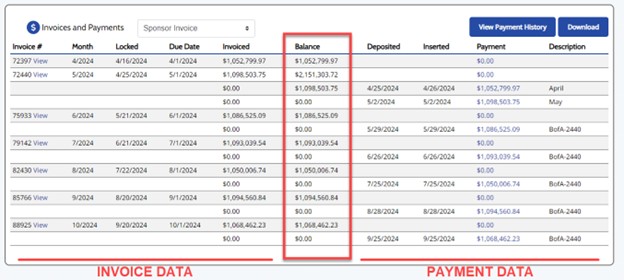
The “Invoices and Payment” section displays invoice data on the left and payment data on the right, with a running balance in the center column. Invoices are sorted oldest to newest- scroll to the bottom to find the newest invoice:
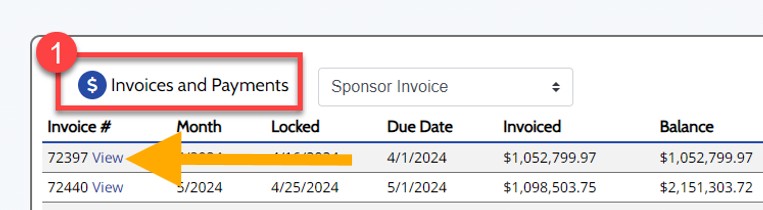
Under “Invoices and Payments”, select “View” beside the invoice you wish to view:
A “View Reports” pop-up will open. Click “View” beside the “Consolidated Bill Invoice Detail” which provides employee level billing detail by plan and coverage.
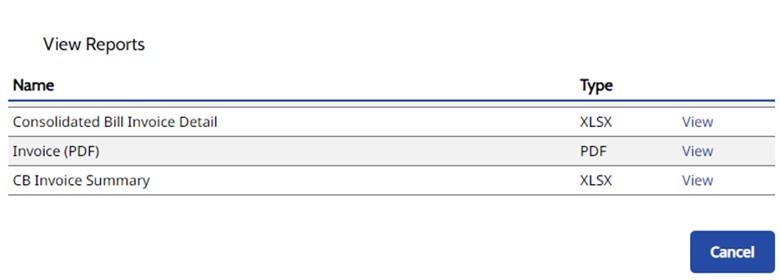
- Once you have downloaded the desired file, click on the blue “Cancel” button to return to the home page.
- Open the downloaded file on your computer.
Information that should be reviewed include:
Last Name, First Name of subscriber (Columns H,I)
Plan Name (Column R)
Coverage Level (Column U)
Total Invoiced (Column AH)
Billing Location ( Column AY)
Firm (Column BA)